Available courses

Hands-on IT training workshop spread over 3 weeks May 26th - June 13th 2025

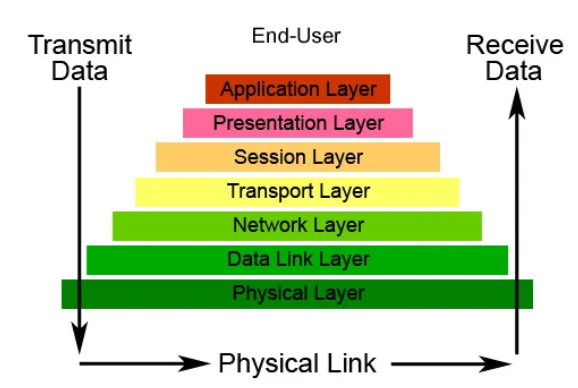
Day 1: Basic Networking    
Day 2-3: Windows Server
Day 4-5: Ubiquiti Networking
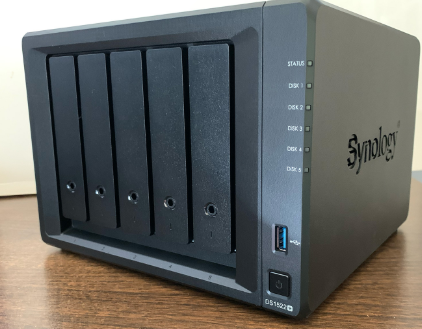
Day 6: Synology NAS
Day 7: Google Workspace Administration
Day 8: Cybersecurity abd Data Protection
Day 9: NComputing
Day 10: Starlink
Day 11: Trouble Shooting
Day 12-13: Wordpress Websites
Day 14-15: Recap and Assessment

This course will provide background theory and knowledge to complement face to face training and hands-on workshops. 

Set up a complete wireless network with Dream Machine Pro. You will learn:

  • Configure the UDM from scratch
  • Configure and manage UniFi Network
  • Configure and manage UniFi Protect
  • Be able to run a complete Ubiquiti UniFi network and cameras

In this course you will learn about the following:

  • OSI model of network layers
  • IPv6 addressing
  • Subnets and subnetting
  • DNS
  • DHCP
  • Trouble-shooting networks

In this course you will learn the following Windows Server skills:

  • Installation and configuration
  • Active Directory
  • Networking (DNS, DHCP)
  • Group Policy
  • Storage and file management
  • Security

In this course you will learn the following Windows Server skills:

  • Failover
  • Cloud integration
  • Automation

Learn how to set up and configure the Synology NAS and where to find support. 

Google Sites is a user-friendly, free web application designed for creating and managing websites without any knowledge of coding. It is part of the broader Google Workspace for Education suite, which includes tools like Google Classroom, Drive, Docs, Sheets, and Calendar. The platform's intuitive "what you see is what you get" (WYSIWYG) interface simplifies the creative process, making it accessible for users of all technical skill levels, from elementary school students to seasoned educators.

In this course you will learn about the following:

  • Google Workstation Administration
  • Familiarity with Google Workstation Apps and features

Comprehensice course on data protection for administrators

Schools and education authorities face growing cybersecurity concerns due to their handling of sensitive student and staff data, limited budgets for robust IT infrastructure, and increasing reliance on digital learning tools, making them attractive targets for ransomware, phishing, and data breaches. Outdated systems, insufficient cybersecurity training, and the rapid adoption of edtech platforms without adequate safeguards heighten vulnerabilities. Breaches can disrupt learning, compromise minors’ privacy, incur financial penalties, and erode trust. Proactive measures—such as updated security protocols, staff/student education, and investment in threat detection—are critical to safeguarding educational environments and ensuring compliance with data protection regulations.

This course will cover installation, configuration and troubleshooting of nComputing systems including the L300 series and VSpace 10 and 11.

Goal: Equip IT officers with foundational awareness of safe productive AI use

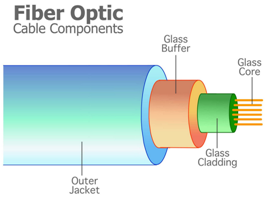
This self‑paced course is based on the Certified Fibre Optic Technician (CFOT) study guide. It includes:
1. Introduction to Fibre Optics.
2. Manufacturing and Design. 
3. Principles of Light & Digital Transmission.
4. Transmission Parameters. 
5. Fibre Characteristics & Performance.
6. Components & Systems. 
7. Cabling & Installation.
8. Testing & Troubleshooting.
9. Applications & Innovations.

Practical and ethical considerations in leveraging Artifical Intelligence to support productive work. Improve your ability to understand and use artificial intelligence, encompassing both its potential benefits and risks. Develop the skills, knowledge, and understanding necessary to engage with AI systems in a responsible and informed manner. 

The basics of building WordPress websites. Learn how to install WordPress and set up a website, how to create pages and post content, and how to install plugins and themes. Implement best strategies and techniques for building WordPress websites. Identify the best plugins and themes for building different types of websites. Work with the most powerful and sophisticated WordPress plugins

Learn the fundamentals of IPv6, including key concepts of IPv6 Header Format, IPv6 Extension Headers, IPv6 Address Representation, IPv6 Address Types, IPv6 Neighbor Discovery & Address Autoconfiguration. This course includes a Practice Lab configuring SLAAC/DHCPv6 on either Cisco, Juniper or MikroTik routers. This course takes approx. 3-4 hours to complete.

Learn about IPv6 address planning for ISPs, enterprise and data centre networks. The course covers 19 topics including planning considerations, subnetting concepts and implementation scenarios for ISPs, data centres and enterprises. The course takes approximately 90-120 minutes to complete.